Monitoring with FastJobs.Dashboard
FastJobs.Dashboard is an optional Blazor-based UI for monitoring and observing the state of your FastJobs system in real time. It surfaces job throughput, worker health, recurring job schedules, and upcoming scheduled jobs — all updated live via SignalR with periodic polling of the FastJobs engine.
Installation
dotnet add package FastJobs.Dashboard
Setup
Note: The dashboard requires a web host. It will not work in a console app or generic host without an HTTP pipeline.
Add the following using statement:
using FastJobs.Dashboard;
Register the dashboard services alongside FastJobs in your DI setup:
builder.Services.AddFastJobs(
    option => { option.WorkerCount = 4; },
    new FastJobMysqlDependencies(options => options.ConnectionString = connectionString)
);

builder.Services.AddFastjobsDashboard();
Then wire up the middleware and endpoints. The dashboard middleware must be registered before routing to allow internal path rewriting:
var app = builder.Build();

app.Services.UseFastJobs();
app.UseFastjobsDashboard("/Dashboard"); // must come before UseRouting()

app.UseStaticFiles();
app.UseRouting();
app.UseAntiforgery();

app.MapFastjobsDashboard();
The dashboard is now accessible at /Dashboard.
Pages
Overview
The overview page gives a high-level snapshot of the system’s current health at a glance.
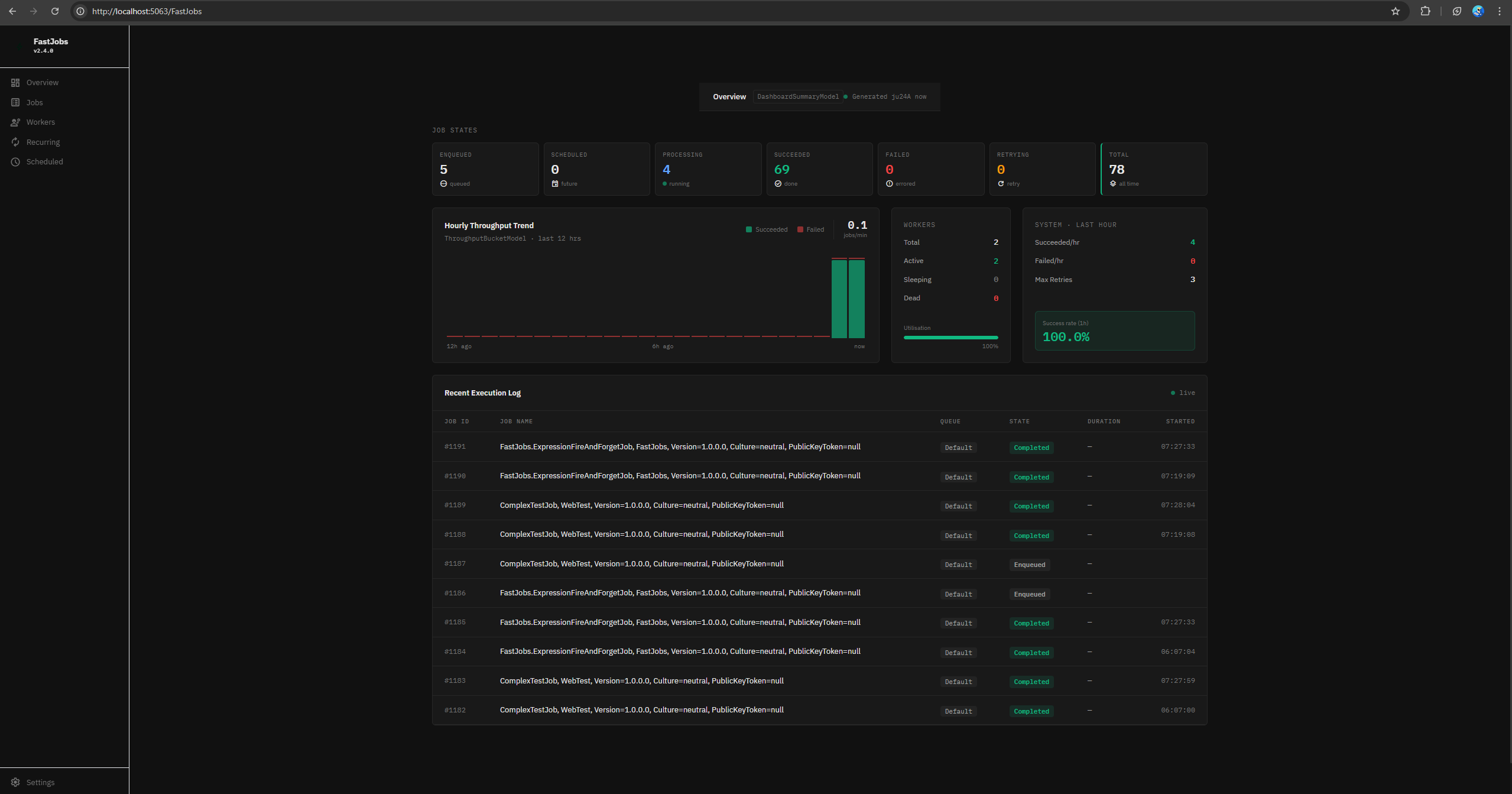
System health metrics
| Metric | Description |
|---|---|
| Enqueued | Jobs currently waiting to be picked up by a worker |
| Succeeded | Total jobs that completed successfully |
| Retrying | Jobs that failed and are awaiting a retry attempt |
| Active workers | Workers currently executing a job |
| Sleeping workers | Workers that are idle and waiting for work |
| Dead workers | Workers that have stopped responding |
Throughput chart
An hourly bar chart comparing jobs enqueued vs. jobs completed. Use this to identify processing bottlenecks — a consistently growing gap between enqueued and completed bars indicates your worker count may need to be increased via option.WorkerCount.
Jobs
A paginated list of all jobs the system has processed or is currently tracking.
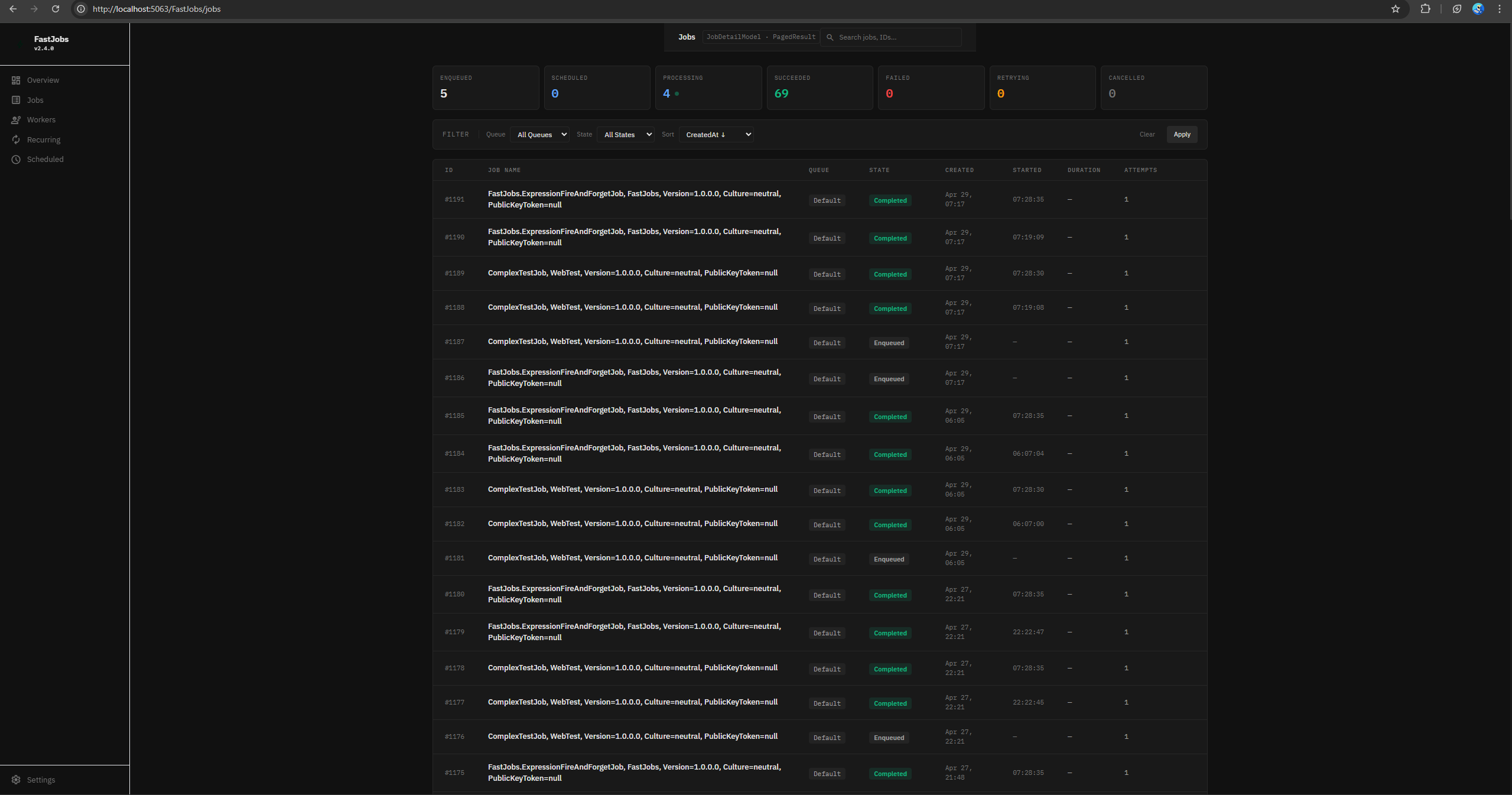
| Field | Description |
|---|---|
| ID | Unique job identifier |
| Job Name | The job class name or lambda descriptor |
| Queue | The queue the job was dispatched to |
| State | Current state (Enqueued, Running, Succeeded, Failed, Retrying) |
| Created | When the job was enqueued |
| Started | When a worker began executing the job |
| Duration | Total execution time |
| Attempts | Number of execution attempts including retries |
Filters: Queue, Job Type, Job State.
Workers
Shows the status and performance metrics for every worker in the pool. The worker count is configured via option.WorkerCount in AddFastJobs().
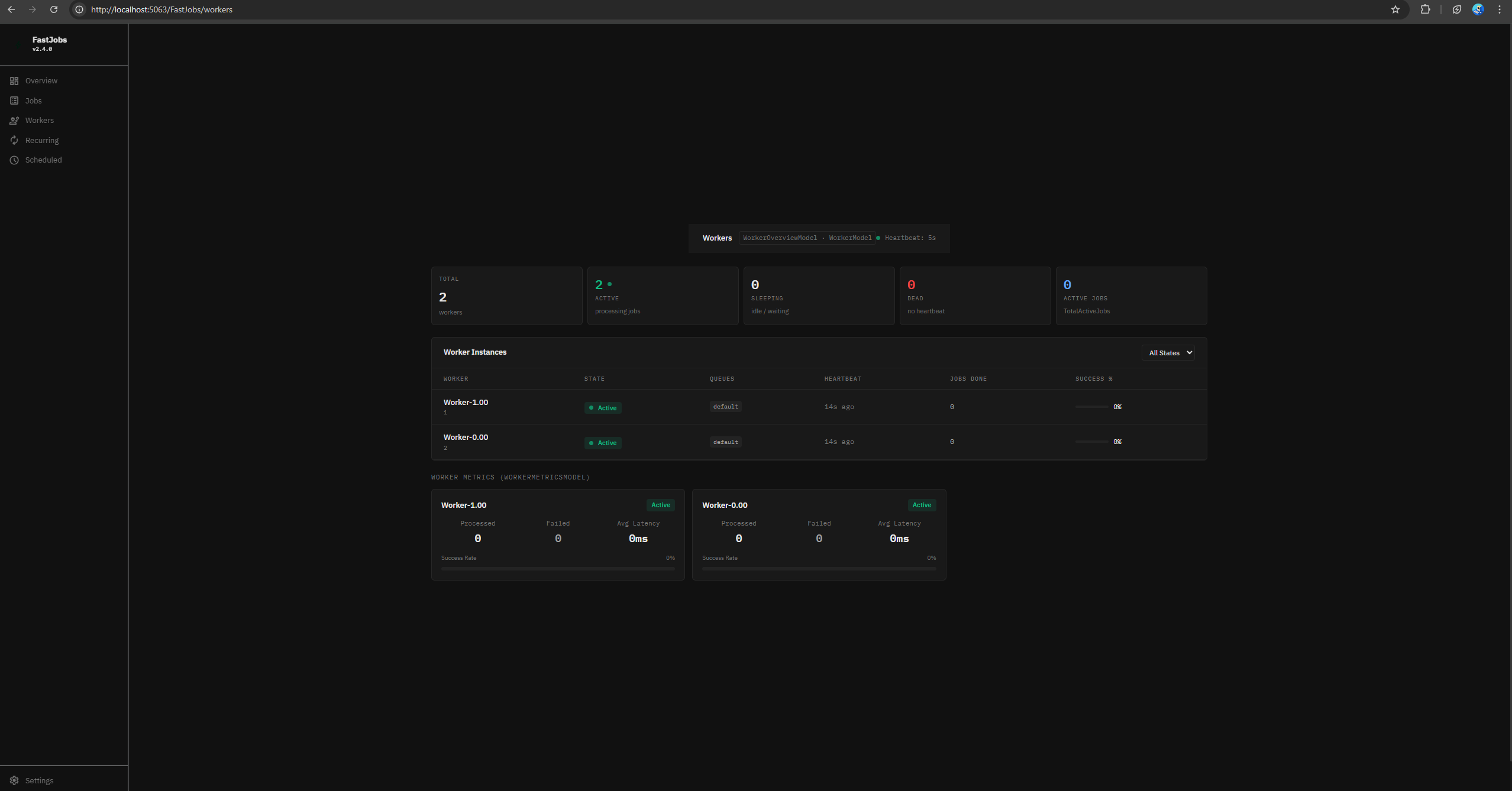
Worker list
| Field | Description |
|---|---|
| Worker Name | Internal worker identifier |
| State | Active, Sleeping, or Dead |
| Queues | Queues this worker listens on |
| Heartbeat | Timestamp of the last heartbeat signal |
| Jobs Done | Total jobs processed by this worker |
| Success % | Percentage of jobs completed without error |
Filters: Worker State.
Worker metrics summary
Aggregate efficiency stats across all workers:
| Metric | Description |
|---|---|
| Processed | Total jobs processed across all workers |
| Failed | Total jobs that exhausted all retry attempts |
| Avg Latency | Average time between a job being enqueued and a worker picking it up |
| Success Rate | Percentage of processed jobs that succeeded |
Recurring Jobs
Lists all recurring jobs registered via AddRecurringJob(), whether cron-based or interval-based.
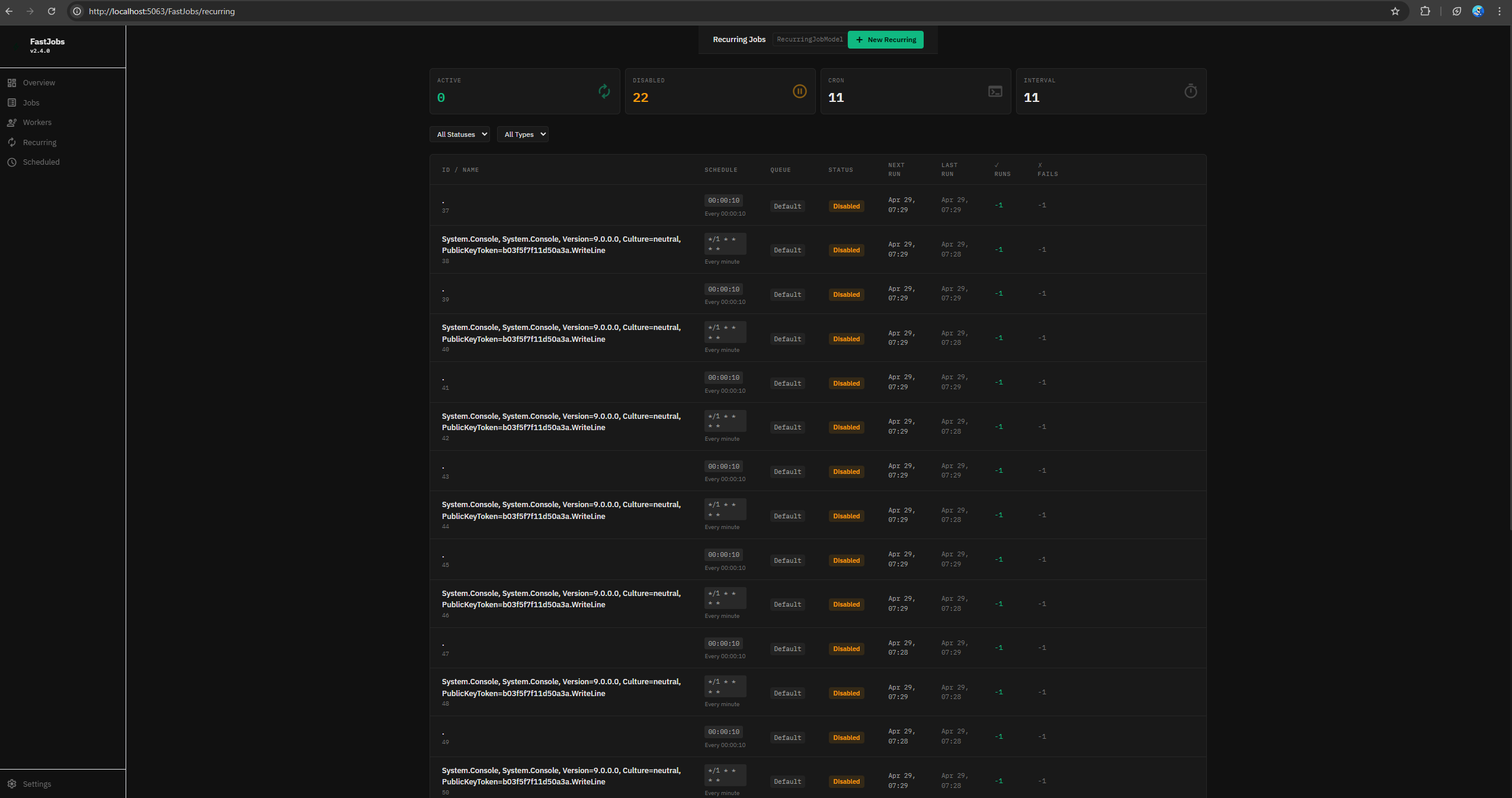
| Field | Description |
|---|---|
| ID / Name | Job identifier or registered name |
| Schedule | Cron expression or interval definition |
| Queue | Queue the job dispatches to |
| Status | Whether the recurring job is active or paused |
| Next Run | Timestamp of the next scheduled execution |
| Last Run | Timestamp of the most recent execution |
| ✓ Runs | Total successful executions |
| ✗ Fails | Total failed executions |
Filters: Job Type (Cron or Interval), Status.
Scheduled Jobs
Lists all one-off delayed jobs registered via ScheduleJob(), as well as the individual scheduled instances generated by recurring jobs.
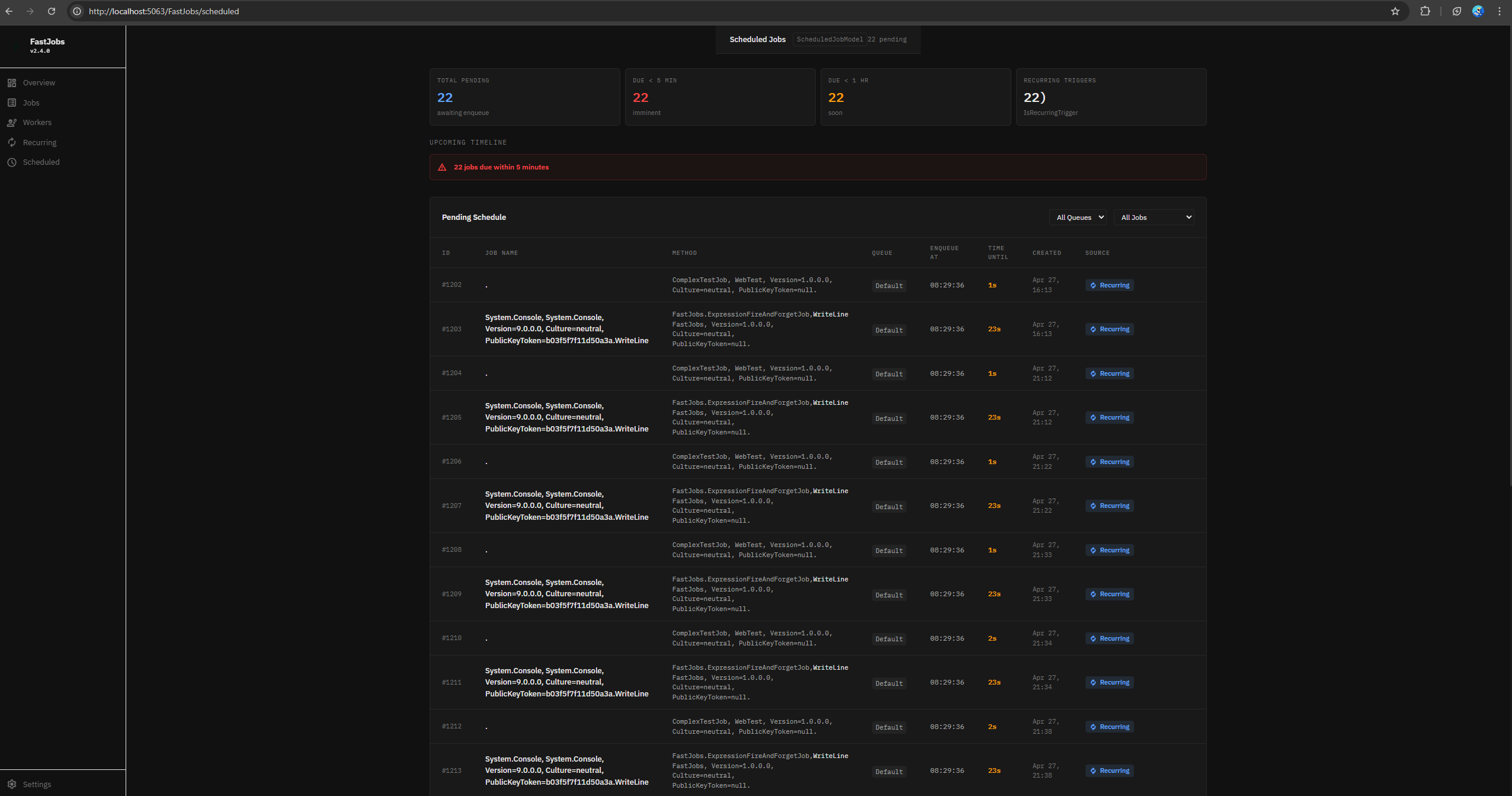
| Field | Description |
|---|---|
| ID | Unique identifier for the scheduled job instance |
| Job Name | The job class name or lambda descriptor |
| Method | Execution method (concrete class or lambda) |
| Queue | Target queue |
| Enqueue At | The datetime the job is scheduled to be enqueued |
| Time Until | Countdown to the enqueue time |
| Created | When the schedule was registered |
| Source | Whether this was a one-off schedule or generated by a recurring job |
Filters: Source (One-off or Recurring).
Real-time Updates
The dashboard uses Blazor with SignalR for live updates. Job state changes, worker heartbeats, and throughput metrics are pushed to the UI as they happen, without requiring a page refresh. A periodic polling fallback ensures the dashboard stays consistent even if the SignalR connection is briefly interrupted.